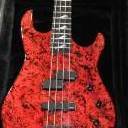
Jimbilly Posted May 6 Posted May 6 whoever works at this pawn shop knows enough to have gotten quite a few details right, or they are very good at using google. This is an unusual finish for a Centaura? Sounds kind of beatup, - but they do often discount, depending on who you talk to. Physical location is Spokane WA, which is the far East side of the state, a bit too much of a drive for me to go see (5hrs+) https://shop.pawn1.com/Item/Details/HAMER-USA-CENTAURA-1990-IRIDESCENT-SWIRL/ef8174cd53934f14bc4a6a09427524a4 3 Quote
Jimbilly Posted May 6 Author Posted May 6 T-62 in Seafoam Green. Same pawn chain, but an Idaho store, they say 'like new' condition, $2020 + $125 shipping https://shop.pawn1.com/Item/Details/HAMER-GUITARS-T-62/692ee8d80c174deba4b5b1d62334cd69 3 Quote
Saul Goodman Posted May 6 Posted May 6 4 hours ago, Jimbilly said: whoever works at this pawn shop knows enough to have gotten quite a few details right, or they are very good at using google. This is an unusual finish for a Centaura? Sounds kind of beatup, - but they do often discount, depending on who you talk to. Physical location is Spokane WA, which is the far East side of the state, a bit too much of a drive for me to go see (5hrs+) https://shop.pawn1.com/Item/Details/HAMER-USA-CENTAURA-1990-IRIDESCENT-SWIRL/ef8174cd53934f14bc4a6a09427524a4 I've seen that finish quite a few times. 1 Quote
from my fingers Posted May 10 Posted May 10 I went and looked at the t 62, the first 5 frets bellow the g string were just destroyed, the rest of it was clean. I could have bought it for 1700 otd, I passed. 1 Quote
Dave Scepter Posted May 10 Posted May 10 (edited) Hmmm... I still can't load any photos 😢 https://imgur.com/a/RXIhLaT#KMeOqdw Edited May 10 by Dave Scepter Quote
velorush Posted May 10 Posted May 10 33 minutes ago, Dave Scepter said: Hmmm... I still can't load any photos 😢 https://imgur.com/a/RXIhLaT#KMeOqdw All I did was click the link to display the photo in a browser window, right click the image and choose Copy Image Address and paste the address into this window. Looking at the pasted URL (using the Source button, top left of this window) shows the pasted URL is: "https://i.imgur.com/KMeOqdw.jpeg" compared to your URL, above, "https://imgur.com/a/RXIhLaT#KMeOqdw" Not sure how that URL relates, but clicking it does get me to the picture. It just seems to be read by the board as a hyperlink rather than the photo (notice my URL ends in .jpeg). Try displaying the photo in a browser window, right clicking the picture and choosing Copy Image Address, then paste that URL in the board window. That should work. 2 1 Quote
Dave Scepter Posted May 10 Posted May 10 1 hour ago, velorush said: All I did was click the link to display the photo in a browser window, right click the image and choose Copy Image Address and paste the address into this window. Looking at the pasted URL (using the Source button, top left of this window) shows the pasted URL is: "https://i.imgur.com/KMeOqdw.jpeg" compared to your URL, above, "https://imgur.com/a/RXIhLaT#KMeOqdw" Not sure how that URL relates, but clicking it does get me to the picture. It just seems to be read by the board as a hyperlink rather than the photo (notice my URL ends in .jpeg). Try displaying the photo in a browser window, right clicking the picture and choosing Copy Image Address, then paste that URL in the board window. That should work. https://imgur.com/a/RXIhLaT Quote
Dave Scepter Posted May 10 Posted May 10 Nope... won't let me do it... even with "add files" https://imgur.com/a/RXIhLaT Quote
Dave Scepter Posted May 10 Posted May 10 (edited) It works if I copy and paste... "From my laptop"... but I can't add photos via my phone. Edited May 10 by Dave Scepter Quote
golem Posted May 11 Posted May 11 I bought a mint Anderson from their Federal location about two weeks ago. It's stupidly good. 1 Quote
holLoWskull Posted May 12 Posted May 12 I wonder if that T-62 is Austin’s (atquinn) old one? I remember his had a SFG headstock face like this one (instead of the typical black headstock face). I suppose one who’s more motivated than myself could search the old HFC threads to see if the serial # is the same as this guitar that’s listed? T-62’s are great “Strat-ish” guitars, I just wish they had come with chunkier neck profiles. Quote
Recommended Posts
Join the conversation
You can post now and register later. If you have an account, sign in now to post with your account.