Jump to content
Hamer Fan Club Message Center
  • 0

Studio Monitors on the Cheap


velorush

Question

Posted

In a purchase it seems I have acquired Cubase LE 6 and now have the ability (theoretically) to record sounds (I'll stop short of calling anything I record music and just leave it at "sounds"). My 1998 Dell PC speakers are likely not giving me the full story, but at this point this is just a toy so I don't want to throw a bunch of money [that could be spent on something like a guitar - after the Challenge is over] into something that may be a passing fancy.

So, are these any good (for $80 a pair)? Or would there be something more highly recommended for similar outlay?

DV016_Jpg_Large_600589.jpg

Bear in mind Musician's Friend could be key in this as I received from them the other day a mailing to the effect of "hey, you used to buy a bunch of stuff from us but haven't in a while. Here's a 20% off discount card..." ;)

19 answers to this question

Recommended Posts

Posted

For that price these are pretty good. They add some color to the sound and won't be as good for mixing as some higher priced monitors but they will be better than most computer speakers. You will have to listen to music you like on those speakers to help gauge how your recordings sound but without going up 3 or 4 times in price you won't do too much better.

Posted

For that price these are pretty good. They add some color to the sound and won't be as good for mixing as some higher priced monitors but they will be better than most computer speakers. You will have to listen to music you like on those speakers to help gauge how your recordings sound but without going up 3 or 4 times in price you won't do too much better.

The exact advice I was looking for. Thanks!

Posted

I always have to consider cost! ;-)

Aah, don't be a pussy. Step up to Genelec or Westlake Audio. I'm sure you have a car or two you could sell.

350-1038B_rightangle.jpgsm1.jpg

Posted

I always have to consider cost! ;-)

Aah, don't be a pussy. Step up to Genelec or Westlake Audio. I'm sure you have a car or two you could sell.

Two words: You First! :lol:

I loved Sweetwater's note on the Genelec page: "Special Order, But We Can Get It Fast" [read: if anyone actually is interested in purchasing a pair of these at our 10% discounted price of just a hair under $17,000, we'll have Chuck Surack personally call the good people at Genelec and have a set shipped over to you. If you need a Cessna Citation, we can take care of that, too! Also not in stock, but we can get it to you really, really fast!"]

Posted

I always have to consider cost! ;-)

Aah, don't be a pussy. Step up to Genelec or Westlake Audio. I'm sure you have a car or two you could sell.

Two words: You First! :lol:

I loved Sweetwater's note on the Genelec page: "Special Order, But We Can Get It Fast" [read: if anyone actually is interested in purchasing a pair of these at our 10% discounted price of just a hair under $17,000, we'll have Chuck Surack personally call the good people at Genelec and have a set shipped over to you. If you need a Cessna Citation, we can take care of that, too! Also not in stock, but we can get it to you really, really fast!"]

So you're thinking about cheaping out with the Genelec for $17K? You really need to consider moving up to those Westlake Audio monitors (love those wooden horns) at $190,000/pair. :lol: Plus they'll easily fit on your desktop at 49" wide and 550 lbs. each. Dainty little things, really.

Posted

You're just starting the slide down a very long slippery slope! There is an endless amount of new gear, software, and especially knowledge to acquire when you start home recording.

I've got a pair of M-Audio AV40 monitors. I like them a whole lot. The focus is amazing, in some ways better than a good set of headphones, for locating in space where an instrument is left/right, near/far, and even up/down. These aren't necessarily super special speakers, but I would recommend them.

You'll want some kind of little stands to get them off the desk surface. You will probably want to put a slice of foam under the speaker to decouple them from the stand and desk surfaces.

Coursera.com has a superb free Music Production class from Berklee. I highly recommend it for anyone who is not already a pro studio technician. https://www.coursera.org/course/musicproduction

Posted

I don't fully understand those Alesis monitors with the USB. It seems that they only connect via USB. Which means you stream digital data out to them rather than use a 1/8" mini plug to connect them to an audio output from your computer. I can't think of a benefit of this set up.

On the other hand, they allow you to use them as a USB input device for recording. So you don't have to buy a USB interface device to get your instrument plugged into your computer.

Posted

You're just starting the slide down a very long slippery slope! There is an endless amount of new gear, software, and especially knowledge to acquire when you start home recording.

I've got a pair of M-Audio AV40 monitors. I like them a whole lot. The focus is amazing, in some ways better than a good set of headphones, for locating in space where an instrument is left/right, near/far, and even up/down. These aren't necessarily super special speakers, but I would recommend them.

You'll want some kind of little stands to get them off the desk surface. You will probably want to put a slice of foam under the speaker to decouple them from the stand and desk surfaces.

Coursera.com has a superb free Music Production class from Berklee. I highly recommend it for anyone who is not already a pro studio technician. https://www.coursera.org/course/musicproduction

+1

When I got settled with my amps and gits and effects I found myself a whole new world of gear to explore, home recording equipment! There's a lot of shyte to learn just with the hardware alone, much less learning how to actually record and mix, etc.

I got a nice pair of Mackie HR624 powered monitors for about $300,,, a bit more than $80 but a lot less than $17,000!!

Posted

I don't fully understand those Alesis monitors with the USB. It seems that they only connect via USB. Which means you stream digital data out to them rather than use a 1/8" mini plug to connect them to an audio output from your computer. I can't think of a benefit of this set up.

On the other hand, they allow you to use them as a USB input device for recording. So you don't have to buy a USB interface device to get your instrument plugged into your computer.

I paid no attention to the USB connection other than notice it was there. According to their site, these can serve as a audio interface for the PC. I was looking at the 1/8" input (on the back) for getting sound from the PC to the monitor.

DV016_Jpg_Large_600589_right_speaker_rea

ETA: I'm still not convinced I'm ready to step off on to this slippery slope. I know how this sort of thing goes (at least with me) and it is just as everyone described. I think it would be wiser for me to take a good bit longer to explore the Cubase software and see if this is really going to be something I'll be interested in for the long term, then buy additional equipment.

Posted

I don't fully understand those Alesis monitors with the USB. It seems that they only connect via USB. Which means you stream digital data out to them rather than use a 1/8" mini plug to connect them to an audio output from your computer. I can't think of a benefit of this set up.

On the other hand, they allow you to use them as a USB input device for recording. So you don't have to buy a USB interface device to get your instrument plugged into your computer.

If the control monitor has a USB input then it has to have a USB digital DAC inside. That means you can stream the digital stream from your computer via a standard USB cable. Depending on the computer, you may have to configure its audio interface to send audio to the USB port. Macs generally do this automatically.

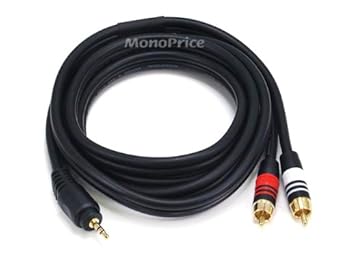
You can also send a computer's stereo analog signal to the monitor with a stereo mini-to-RCA pair adapter (to which you connect a pair of RCA cables) or cable (which has the right plugs for both ends) such as these:

AQMINI_000.jpg41i%2BBKlCh0L._SX342_.jpg

Posted

All right, so there here (and even cheaper than I'd first found them). I plugged them in (USB), the Codecs loaded and they're up and running.

We A/B'd them with the stock Dell PC speakers (pretty decent PC system for 1998, subwoofer and all). Got started with a little YouTube: David Grissom, followed by my son's favorite, a Christian rapper out of Memphis, Lecrae. We then went to iTunes for some Bottle Rockets followed by Rival Sons followed by some Miles.

Time after time the PC speakers sound much much better. This was a bit upsetting... until I considered function: the monitors are giving me what the music really sounds like - pure uncolored YouTube / iTunes.

Have I got that about right, or is my epiphany in error? Experts?

The one song where we were both really having to pay attention was Miles Davis' "Blue in Green" (incidentally, my favorite song!). I'm sure there's a lesson for me there somewhere, but there really was not as much of a difference between the speakers listening to Kind of Blue compared to the more contemporary songs.

ETA: Nathan wanted to hear some Vintage Trouble but I paused for some Bach on the way (iTunes has The Big Bach Set alphabetized by Vienna State Opera Orchestra - thanks again to SpecialK for alerting me to that incredible deal on Amazon a couple of years back!) - Bach sounded fairly equivalent on both sets of speakers. Vintage Trouble was much better on the PC speakers.

Posted

I bought myself a set of M-Audio AV-40s and they showed up a few hours ago.

Hooked up on my desk to my computer. I'm quite impressed and am listening to Ricky Lee Jones' eponymous first album, which has a great live-in-studio sound to it. Very good initial impressions for low and high volume, detail and stereo placement when listening near-field, which is what they're for in the first place. I'm sure the 4" drivers will break in over the next week or so, but even new they provide enough tonal balance to be quite listenable.

The other use case I got them for was to hook up to my various amp simulators, a digitech GNX-3000 and the portable, practice Korg Pandora. A quick test with the latter and I'm very much enjoying the speakers. Plus I can play music from the PC and jam on top via the speaker's front aux input.

Happy camper!

Posted

Forgot about this thread... :)

In the same vein (hopefully not a hijack...) : what are the smallest "reasonably priced" speakers for a desktop that sound decent? Not looking for reference monitors, just something that I can bust lossy-compressed iTunes music out on... Size is most important (smaller is better), then price (might be persuaded to go up to 200, but would prefer 100...), then sound quality. If they sound like garbage, I have no need to move up from my $20 trade show specials...

Tnx.

Edit to add: by "desktop", I literally mean on a desk, like in an office. They will be connected to a computer as we'll...

Posted

Veatch, they're by no means worthy of the audiophiles here on the board, but I'm telling you, these what? fifteen year old Dell PC speakers sound fantastic (especially after I hit the volume pot with some CRC contact cleaner last weekend). The secret - the subwoofer that resides under the desk. You can't tell it's there (since bass is so non-directional), but it really makes the system sound good (again, for tiny-footprint on-desk speakers).

Found the same set on eBay for cheap.

So that's my take. Somebody with some real knowledge will be along shortly to show you what you should really buy! :)

Posted

So, are these any good (for $80 a pair)? Or would there be something more highly recommended for similar outlay?

DV016_Jpg_Large_600589.jpg

Bear in mind Musician's Friend could be key in this as I received from them the other day a mailing to the effect of "hey, you used to buy a bunch of stuff from us but haven't in a while. Here's a 20% off discount card..." ;)

I'd say, for $80 that's a great deal for PC desktop speakers. However, for doing true mixes with your Cubase tracks, run the EFF away..! Even the addition of a subwoofer wouldn't get you close to the true sound of what your mics and are hearing.

"Studio Monitors on the Cheap?" Unfortunately, you get what you pay for. I would take your 20% MF coupon and get these. I use them with Logic/Mackie Onyx 1601i firewire mixer and they sound fantastic after the coupla weeks break-in period.

Trust me on this: when it comes to powered monitors, "buy cheap, sound cheap..."

Posted

Veatch, they're by no means worthy of the audiophiles here on the board, but I'm telling you, these what? fifteen year old Dell PC speakers sound fantastic (especially after I hit the volume pot with some CRC contact cleaner last weekend). The secret - the subwoofer that resides under the desk. You can't tell it's there (since bass is so non-directional), but it really makes the system sound good (again, for tiny-footprint on-desk speakers).

Found the same set on eBay for cheap.

So that's my take. Somebody with some real knowledge will be along shortly to show you what you should really buy! :)

Along the same lines, I've been very happy with the Boston Acoustic BA635's for the last 15 years. For the BIN price, they are much better than new speakers at the same price. If you can get them for less, they are a steal!

Posted

I bought a pair of Behringer MS 40's today which sounded pretty decent for the money, until one channel fizzed, and then died, my Wharfedale subwoofer did really help fill out the low frequencies.

Jaberwock

Archived

This topic is now archived and is closed to further replies.

×
×
  • Create New...